Google Premier Partner
 Meta Business Partner


At the end of September, the campaign-level language setting disappears from Search and from AI Max for Search. You will no longer choose which language a campaign targets. Google decides that itself, based on the language of the query, the language of your ad and the preferences someone has set in their browser or account. For an advertiser selling in a single language within a single country, little changes in Google advertising in practice. For anyone serving two variants of the same language, or reaching international customers in several languages, it is a different story. Dutch shops that also sell into Flanders are a textbook case, and we use them as the running example in this article. Split your ad groups by language now, before Google starts doing that work for you and mixing it up.
What exactly is changing
Google is removing manual language criteria from Search campaigns and from AI Max for Search. In Performance Max the setting remains for YouTube, Display, Discover and Gmail, but no longer for the search part of those campaigns. If you try to add a language criterion to a Search campaign through the API after the effective date, you get the error OPERATION_NOT_PERMITTED_FOR_CONTEXT back.
Matching itself will be based on signals. Think of the language of the search term, the language setting of someone's account and previous search behaviour. A user who searches in English but has Dutch set as their preferred language may well be shown a Dutch ad. Google itself does not call this a fundamental change of course, more a shift from a hard setting to a dynamic estimate.
Why this is more than a technical detail for Dutch and Belgian accounts
In practice, language campaigns run by Dutch advertisers are often less neatly separated than they look on paper. One Search campaign with Dutch ads, targeting both the Netherlands and Flanders, is almost standard for online shops that want to sell across the border. Until now that worked fine, because the language setting itself was the main lever for filtering out unwanted traffic.
That lever is going away. And Flemish and Dutch audiences are linguistically closer than many advertisers think, but not identical. A Flemish visitor searches for kleedje where a Dutch one searches for jurk (dress), and for zetel where in the Netherlands people type bank (sofa). If your ad copy and landing page only use Netherlands-Dutch terms, you will miss part of the Flemish queries that Google does assign to your campaign, simply because language detection lands on "Dutch" without distinguishing between the two variants.
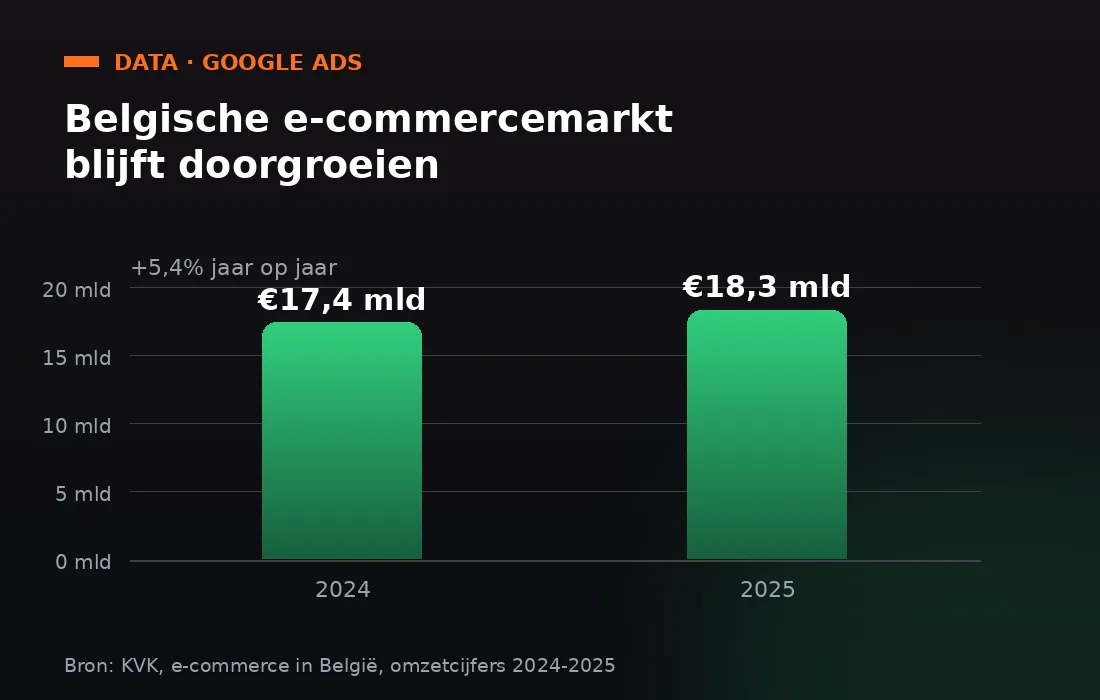
The stakes are not small. The Belgian e-commerce market grew by 5.4 percent in 2025 to 18.3 billion euros in revenue, up from 17.4 billion euros a year earlier. For Dutch companies already selling across the border, or considering it, this is not the moment to leave the language targeting of their campaigns to chance. The same logic applies to any pair of neighbouring markets that share a language, such as Germany and Austria, or France and Wallonia.
You will no longer be able to choose explicitly which language your campaign targets. Make sure your ad groups already do that work, before the algorithm fills it in for you.
The mistakes this change exposes
Most of the damage does not come from Google doing something new, but from old structures that were never built for this situation. Four patterns keep coming back.
One ad group with a mix of Dutch and Flemish keywords is the most common. As long as the language setting existed, it did not stand out much. Once Google itself decides which ad belongs to which query, an unclear structure becomes immediately visible in the form of weaker relevance and a lower quality score.
Landing pages that do not match the search term are a second problem. An ad that Google shows to a Flemish searcher but links to a page full of Netherlands-Dutch product descriptions simply converts less well. That was already true with language targeting, but it matters more now that you can no longer throttle the inflow at the source.
Brand and generic keywords that are identical in both language variants are a third pitfall. Google then falls back on other signals, such as the user's preferred language, to decide which ad copy is shown. If you have only one ad for such a keyword, this is not an issue. If you have two variants competing for the same search term, the split can turn out more erratic than you are used to.
A final, often overlooked group is the scripts and API integrations that still automatically write language criteria when creating new Search campaigns. After the effective date these break on Google's error message, and you often only notice when a colleague tries to launch a new campaign and nothing works any more.
Checklist for this week
- Split mixed ad groups into a Dutch and a Flemish variant, each with its own keywords and its own ad copy.
- Replace generic Netherlands-Dutch product names on your Flemish landing pages with the local variant, or at least test a separate content version.
- Search your scripts and API integrations for references to language criteria on Search campaigns and remove them before the effective date.
- Use the search terms report more often than usual in the first weeks after the change to see whether the share of Flemish queries shifts.
- Record a baseline of conversion rate per region for yourself, so you have a real comparison once the new matching is active.
Do you sell exclusively in one country and have you never deliberately used a separate language setting? Then this is mainly something to know about, not something to panic over. The impact sits almost entirely with accounts that serve several variants within one language area, or advertise internationally in several languages at once.
What this means for international campaigns
If you also advertise in English, German or French for a wider European audience, the same lesson applies, only at a larger scale. Google itself gives the example of a user who searches in English while their preferred language is Spanish. Both ads can then be in the auction, and the system picks what it considers the best match. For accounts with many languages side by side, there is a greater chance that budget drifts towards the language version that happens to score slightly better on click behaviour, not necessarily the version that makes most sense for your audience.
In practical terms, this means your conversion tracking per language version has to be in order before the change takes effect. Without that overview you only notice a shift once the budget has already been spent.
Not sure whether your account structure is ready for this change? Book a strategy call and we will walk through your campaigns language by language with you.
Frequently asked questions
Do I need to change anything in my Google Ads account right now?
If you have mixed several language variants within one campaign or ad group, this is the moment to untangle them. If you advertise in one language within one country, no short-term action is needed, although it is smart to keep a closer eye on your search terms report after the change.
Does anything change in Performance Max as well?
Only for the search part of Performance Max campaigns. For YouTube, Display, Discover and Gmail within the same campaign, the language setting keeps working as you are used to.
Can I leave my existing language criteria in place?
You can, but they no longer affect which ads are shown. Adding new language criteria to Search campaigns through the API is no longer possible after the effective date and returns an error.